How to Update Your Credit Card
Here is how you can update your credit card information in 5 easy steps
- Open up https://free.messianicbible.com in a new tab in your browser or click here
-
Click on the Donate NOW button on the top menu of the website

-
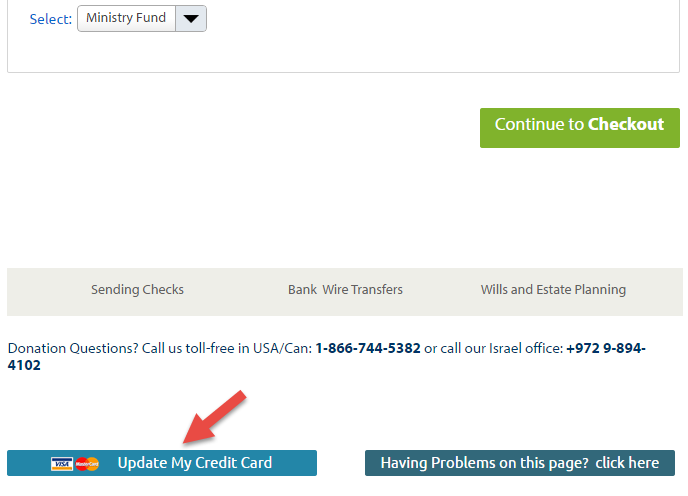
Scroll to the bottom o fthe Donate NOW page and click on the Update My Credit Card button
-
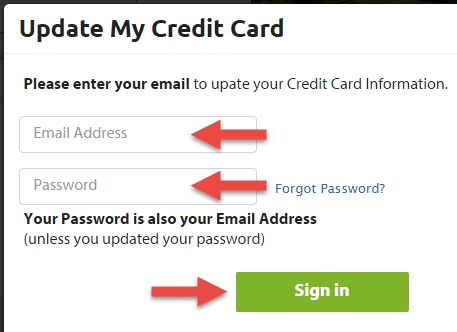
A popup window will appear with a form to sign in. Enter in the email address you use when making a donation and your free.messianicbible.com acount password in the appropriate fields. Then click the Sign in button.
Note: if this is your first time signing in or you have not changed your password, enter in your email address in the password field. If you cannot recall your password, click on the Forgot Password link and follow the instructions.
-
After a successful sign in, you will be taken to a page with your current credit card information.
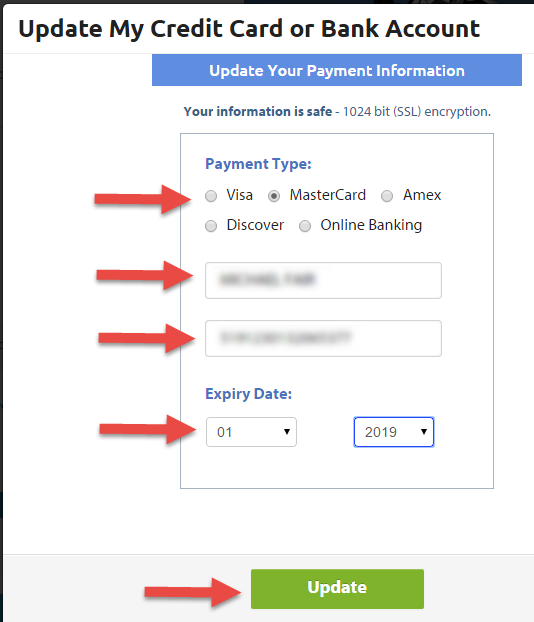
You can review and update the following information on this form: credit card type (Payment Type), the name on the card, the card number and the card expiry month and year.
When you are finished making changes click the Update button.